
Redeem Raft Tycoon Codes
The left HUD gear is the only redeem screen. No website, no chat command.
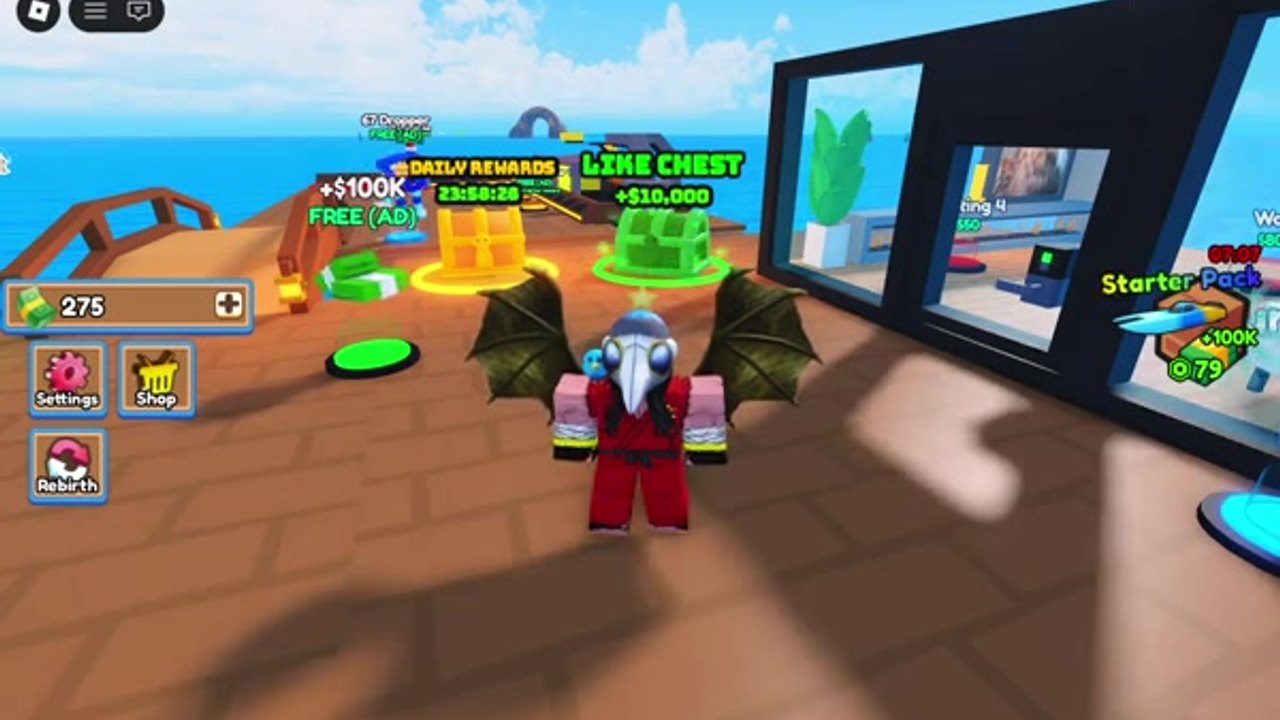
Players lose working codes because they type in chat, open the Roblox website redeem (that is a different product), or paste while still in the lobby. Raft Tycoon only reads strings from the in-game Settings panel after you own a tycoon pad. This page is the mechanical checklist. The live list lives on the codes hub.
Before you open Settings
- Click Play on the official Raft Tycoon experience (place 76137189788863).
- Wait for the ocean load. If you land in a lobby with a spawn portal, walk through to a server that still has an unclaimed pad or rejoin until you see wooden plates.
- Step the Claim Tycoon button. Codes will not credit a spectator.
- Confirm the left HUD: cash amount, plus buttons for Settings, Shop, and Rebirth. That trio is how you know you are on your own raft.
If the HUD is missing, you are visiting someone else through the spawn portal. Portal back. Visiting other rafts is useful later for layout ideas (see expand raft), but it is the wrong place to redeem.
PC redeem
- Click the gear under the cash counter.
- Find the Code row. The empty field is labelled something like Type…
- Paste one string from the active table. Do not chain two codes with a space.
- Press Enter. Success text replaces the field. Failure text usually means expired, already used, or a typo.
- Close Settings. Walk to the cash collector / ATM so the new balance is visible. Some payouts sit in the collector until you touch it.
Use Ctrl+V. Typing Winter as Wnter burns nothing, but typing Freemoney as two words burns a minute and a lot of forum comments.
Mobile redeem
- Thumb the same gear on the left stack.
- Tap the code field so the device keyboard opens.
- Long-press paste from this wiki. Avoid the autocorrect that inserts a space in Freemoney.
- Tap the on-screen Enter / Return on the keyboard, not the Shop button.
- If the keyboard covers the success line, close it and look at the cash counter.
Console players use the same gear with the controller cursor. There is no separate console menu.
Errors and what they actually mean
Invalid / failed. The string is expired, mistyped, or already used on this account. Check the expired list. Do not keep changing capital letters after two failures.
Nothing happens. You pressed Shop instead of Settings, or you are not on a claimed pad. Also happens if you paste with a trailing newline. Click the field, delete, paste again, Enter.
Success but cash unchanged. The reward is a timed 2x (Winter) or the cash is waiting in the collector. Empty the ATM. For Winter, immediately buy a dropper so the ten minutes are not spent sightseeing.
Already redeemed. Codes are once per Roblox account, not once per raft or once per rebirth. Rebirth does not refresh codes. That is documented on the rebirth guide.
Order of operations after a successful redeem
Codes are wasted if they fund a Golden Yacht before your first upgrader. Follow the same spend order as the make money page:
- Dropper sockets on the belt you already own.
- Golden Upgrader pads (often cheaper than a third dropper).
- Expansion plates toward the next conveyor.
- Boat dock only after the second belt exists.
If you redeemed Winter, do those four purchases first, then start the boost. If you redeemed Shark (45,000), you can skip straight to a new area plate plus Dropper 3. Pair with a friend invite for the 10% bonus listed on the game overview.
Where people look at the wrong screen
The Roblox website has a promotions box for site-wide codes. That box will not accept Winter. The Shop button sells gamepasses such as Auto Collect, which is not a code. Chat filters will eat FLAPPY if you try to share it there. Keep the string on this wiki, paste once, close the panel.
When Flappy Bit ships a numbered update, new strings usually land in Discord announcements first. We copy them onto the codes hub and note the patch on latest updates. Bookmark the hub, not a screenshot from three months ago.
Controls reminder while you redeem
You still need WASD or the mobile stick to walk to the collector after a payout. Jump (Space / on-screen jump) is enough if a shark patrols the edge. Full bind list: controls. Do not open a script GUI to auto-redeem; that is a different (and bannable) path on the scripts hub.
Frequently Asked Questions
Quick answers players actually search for in Raft Tycoon.
Where is the code box in Raft Tycoon?
Open the Settings gear on the left HUD after you claim a tycoon. The Type field is in the middle of that panel.
Do I redeem codes on the Roblox website?
No. Only the in-game Settings panel accepts Raft Tycoon strings.
Why did my cash not go up after Success?
Winter is a timed 2x, not a lump. Other payouts can sit in the cash collector until you walk into it.
Can I redeem the same code after rebirth?
No. Codes are per Roblox account. Rebirth resets the raft, not your redeem history.